Showing posts with label software. Show all posts

Saturday, 6 April 2013

Install Ginger to Avoid Spelling Mistake For Chrome Users

0 comments
Hi friends. I’m going to share a great free spelling and grammar checking extension for Chrome users. It’s from Ginger.

When there is a grammar topic you don’t fully master, you might repeat the same mistakes over and over, both in writing and speaking. Ginger is the only grammar tool that helps you learn from your own mistakes. If you’re a native English speaker you may not make grammar mistakes. But typographical errors are unavoidable. So for Chrome users I am sharing a great extension. Ginger is providing one of the world’s best spelling and grammar checker for Chrome users.

Ginger 

Install the extension from the below link for free and forget about spelling and grammar mistakes. Now you are only one step away from avoiding grammar and spelling mistakes while typing. Ginger shows a green dotted line below texts with errors. You can right click on the text underlined to correct spelling or grammar mistakes. Ginger shows suggestions so brilliantly.

I find this Chrome extension from Ginger, the world’s #1 contextual grammar and spell checker, very useful. It helps users to avoid spelling and grammar mistakes within Gmail, Hotmail, Yahoo! Mail, Google+, blogging platforms (such as WordPress, Blogspot, LiveJournal) and any other applications using Rich Text Input.

Link : Ginger Spell and Grammar Checker for Chrome

Wednesday, 20 March 2013

How to Create Animated Gif Using Camtasia Studio

0 comments

Have you ever seen moving pictures online and wondered how they are made? Heres how to make a basic GIF picture with Camtasia Studio.
 
What is Camtasia Studio?
Camtasia Studio is an advanced screen video recorder from TechSmith® which has edit, produce, and many more options to enhance your video, all in one program. One of the producing options in this program is GIF for a recorded video, which we will be learning about.
 
How to start
Well first of all, download Camtasia Studio 7.0. There is a 30-day trial version that you can use but also i give out the full version registration code, so download one of these programs and install it on your PC. After you open Camtasia Studio, getting to know your interface would be helpful in the long road, but it’s not necessary.
 
Recording your video
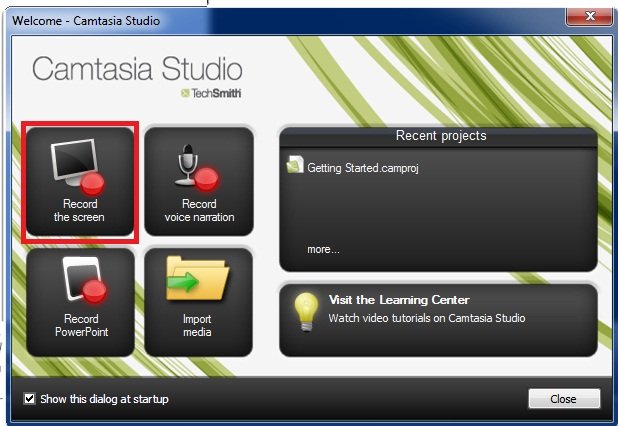
Notice when you first open the program, a window pops up showing 4 options, one being “Record the Screen.” I have illustrated it here:

2

Or you can click on “Record the Screen” in the task list of the interface.

3
 
The next step is self-explanatory, you choose the area you want to record or you choose the whole screen, depends on what you want, then start recording after the 3-second countdown. Stop by pushing F10 or the “Stop” button

Producing it into a GIF animation
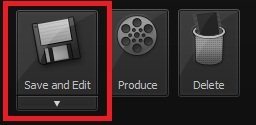
After you finish recording your video, a preview appears and in the corner there are 3 options:
Save and Edit, Delete, and Produce.

4

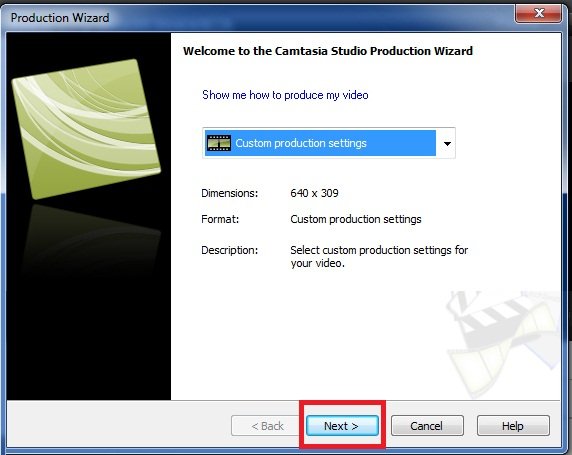
Click on Produce, save your video, and choose “Custom Production Settings” from the drop-down list and click “Next”.

5

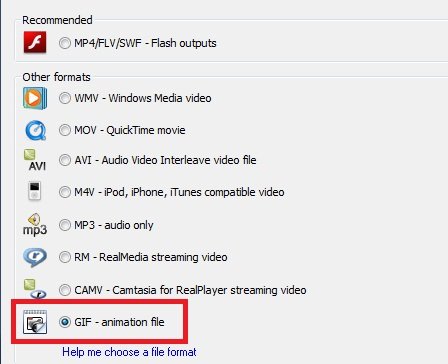
Then comes the Output format screen, which has lots of formats, GIF being one of them, choose it:

6

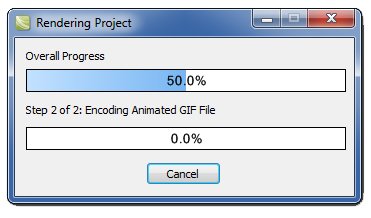
Then click Next on all the following screens, as they are not necessary. You may edit some forms for modified animations but I won’t go there. (On the last form is the name of the video so you should change that.) After clicking Finish on the last screen, it will start converting.

7 
Now this will take some time depending on the length of the video (40 seconds is more than enough). Lagging occurs when the video exceeds 35-40 seconds.And you are done! Your video is now gonna play in picture format, so you can send it to your cell-phone, upload it to your website in the format of a picture!

8

Friday, 8 February 2013

Handwrite math in over 600+ applications & websites

0 comments

MathType 6.8 takes full advantage of Windows Math Input Panel (available in Windows 7 and later,) which provides support for handwritten math recognition. With MathType and the Math Input Panel you can easily write out your equations and insert them into over 600+ applications and websites.
 
Mouse, tablet, or pen
Although you can handwrite equations using only a mouse, for best results we recommend using a tablet or a pen device.
 
Opens within Microsoft Word
MathType 6.8 adds a button to Microsoft Word's ribbon, and a menu command to MathType. Each brings up the Math Input Panel ready for handwriting equations.
 
Build large equations from small handwritten expressions
While entering math by hand using the Math Input Panel is easy for simple expressions, MathType's editing comes in handy for combining simple expressions to make larger ones or when correcting mistakes. Math Input Panel together with MathType gives you the best of both worlds.
 
We're listening
You can download a 30-day full version of MathType and try MathType's handwritten math and the other new features for free. When you do, we would love to hear what you think. Send us an email or talk with us on
Facebook, Twitter, or YouTube!

Tuesday, 22 January 2013

Audio and Multimedia Software

0 comments
jetAudio

jetAudio supports all major digital audio/video file formats, and CD/DVD*/VideoCD. New Media Center window provides various features including new Media Manager, Explorer window, and Device Manager. You can manage all of your digital media files in Media Manager. Media Manager provides CD Library, Media Library, Automatic Browsing, Playlist and Automatic Playlist.

Ulead VideoStudio

Ulead® VideoStudio 11 is an easy to use software for video editing to easily produce videos with professional appearence, slideshows, and DVDs. Share your movies all over, on iPods, YouTube, or the new HD home theater systems, with full support for discs as AVCHD, Blu-ray and HD DVD.

DVD MovieFactory for TOSHIBA

DVD MovieFactory for Toshiba is an application software already included in our Toshiba portable device. It is also possible to buy on-line, being version no. 6 the latest one. We can use it for managing all our multimedia files in many different ways. We can create, crop,copy, burn, edit, encode, transfer, import, export, audio an video files.

Sound Forge


Sound Forge™ Audio Studio helps yoy to edit and master professional-quality audio on your home computer. Record live instruments and vocals, sweeten and restore audio, apply studio-quality effects, and convert files with lightning speed. You can even create your own karaoke tracks with the Vocal Eraser tool. With a few simple steps, you can produce broadcast-quality audio on your PC.

Saturday, 19 January 2013

Geogebra - Dynamic Mathematics for Everyone

0 comments
GeoGebra is an interactive geometry, algebra, and calculus application, intended for teachers and students. Most parts of GeoGebra are free software. GeoGebra is written in Java and thus available for multiple platforms.

Its creator, Markus Hohenwarter, started the project in 2001 at the University of Salzburg, continuing it at Florida Atlantic University (2006–2008), Florida State University (2008–2009), and now at the University of Linz together with the help of open-source developers and translators all over the world. Currently, the lead developer of GeoGebra is Michael Borcherds, a secondary maths teacher.

After a successful Kickstarter campaign, GeoGebra plans to expand their offerings to include an iPad and Android version.

GeoGebra is dynamic geometry software. Constructions can be made with points, vectors, segments, lines, polygons, conic sections, inequalities, implicit polynomials and functions. All of them can be changed dynamically afterwards. Elements can be entered and modified directly on screen, or through the Input Bar. GeoGebra has the ability to use variables for numbers, vectors and points, find derivatives and integrals of functions and has a full complement of commands like Root or Extremum. Teachers and students can use GeoGebra to make conjectures and prove geometric theorems.

Most parts of the GeoGebra program are licensed under GPL and CC-BY-SA, making them free software. However some parts, including the Windows and Mac installers, have a license which forbids commercial use and are therefore not free software.

Download Free Software geogebra here.  And GeoGebraTube is the official repository of GeoGebra constructions and GeoGebra related resources.

Friday, 20 April 2012

Active GIF Creator 3.5 (AGIF)

0 comments
Active GIF Creator 3.5 (AGIF) is a powerful, intelligible, compact and affordable gif maker for creating and optimization animated GIF- images, buttons, banners and other Web graphic that attract attention of your site visitors.


With Active GIF Creator you can:
  • make GIF and AVI- animations for the Web and presentation materials;
  • make banners;
  • make 2D and 3D buttons;
  • make various graphic using effects and other program tools;
  • add hidden signatures to GIFs to protect them from unauthorized use;
  • develop creative imagination.
 Program features:
- makes animated GIF- files from set of BMP, JPEG, ICO, PCX, PNG, TGA, PSD- files, and Windows Metafiles;
- imports frames from other GIF- files;
- imports and exports AVI- files, ANI- files (animated cursors) and bitmap strips;
- supports clipboard operations for images (BMP);
- manages list of images;
- edits images using internal image editor or script editor;
- duplicates, merges, crops, resizes, rotates and flips frames;
- defines GIF- files global parameters: GIF size, logical screen size, background color index, number of loops in animation;
- defines offset, transparency, interlacement, delay, title and value "how to remove" for each separate image;
- applies effects to whole image or to its rectangle part;
- puts particles on image;
- uses image collections;
- edits color palettes;
- creates 2D and 3D button images;
- creates animation scripts;
- adds and removes text commentaries;
- optimizes size of GIF- files;
- shows GIF size and download time for different speeds of modems;
- allows to preview your GIF- file on Web pages with different backgrounds;
- adds hidden signatures to GIFs to protect them from unauthorized use;
- creates GIF- files from command line in batch mode;
- saves images of GIF- file as a set of BMP, JPEG, PNG, TIFF or TGA- files;
- saves created animation as a project in a file with extension .agif;
- creates maps for tag <MAP> in HTML;
- generates HTML links;
- supports localization tools for different languages.
Reasons to buy Active GIF Creator.
Virtually every popular image editing software title comes with an option to create animated professional looking GIF images. Yet, most people find these built-in tools very counter- intuitive, complicated and almost impossible to use.
  • Active GIF Creator has many useful features, like support of most popular image formats; internal image editor; rich image editing options; image effects; color palette support; import / export to other graphical formats; advanced open picture dialog (thumbnailer); GIF- file size powerful optimization; HTML image map editor; button creator; batch mode; image collections; animation scripts and others.
  • The program's functionality in combination with the low cost has made it the first choice for many users and software evaluation websites. Plus, Active GIF Creator has a user- friendly, international interface and consumes very little system resources.
  • All registered users are entitled to free technical support and minor upgrades.
If looking for a well-rounded, efficient and affordable tool for creating great-looking animated GIF’s, stop by Active GIF Creator! Editors of 3d2f.com named the program "most perspective among competitors".

Download Active GIF Creator 3.5 (AGIF) sofware here

Monday, 2 April 2012

Learning Essentials for Microsoft Office

1 comments

 
Learning Essentials for Microsoft Office is a great application. It focuses mainly on Students and Teachers to help in their school work.

It contains the following programs

(1) Learning Essentials for Students
(2) Learning Essentials for Teachers
They both include a lot of templates you could imagine to be useful in school work. Templates for book report, class debate, essays, etc are for students. All of them have different subcategories like different types of essays, and their formats with a short description on how/what-to-dos

For example,
"Subject:
In a short paragraph, describe the subject of the book.

Setting:
Explain where and when the story takes place.
Tip: it might be helpful to include maps, pictures or historical information about the setting. "
...................
is what I found for a book report.

Even while you are working on the matter in MS Office, a small window still remains on the right side, to help you remind what all things you need to add, the format/style you should follow, etc.

This is really cool

For Teachers, we see lesson plans and assignments, classroom organization, organization of field trips, charts and diagrams, math worksheets and even handwriting practice.
It includes provision for creating content for "Learning Essentials" to help students.

(3) "Learning Essentials Content Development Kit" is a program with a "wizard" interface to help us use the programs easily. It has step by step procedure for selecting the type of document, whether you are a student or teacher, what you want to do, etc.

Download Learning Essentials for Microsoft Office here

Thursday, 29 March 2012

Download MotionBuilder Personal Learning Edition 7.0

0 comments
Autodesk gives industry professionals and those interested in real-time character animation an opportunity to explore all aspects of this award-winning technology while developing new skills. This special version of Autodesk MotionBuilder provides free access to the software, with no time limit, for non-commercial use.

Available for the Windows? XP Professional and Mac OS? X operating systems.
Autodesk MotionBuilder Personal Learning Edition offers almost every feature found in the full

commercial version of Autodesk MotionBuilder including:
Advanced real-time technology
Unique Story Timeline performance environment
Auto rigging, motion editing, motion layering, storytelling tools, and numerous other features for animating your characters
The ability to import and export FBL files to and from Maya Personal Learning Edition software.


Download MotionBuilder Personal Learning Edition 7.0 here

Saturday, 24 March 2012

Autodesk Homestyler - 3D Software, Freeware

0 comments
Homestyler is a free online service that provides access to home design software created by Autodesk. Free products and services are subject to the terms of use that accompany them. One of the biggest challenges to a decorating or home remodeling project is envisioning how everything will look. Now that is easier than ever before with Autodesk Homestyler.

-Quickly create layouts with drag-and-drop rooms, doors, and furnishings
-Easily experiment with styles, colors, and finishes
-Include specific products from manufacturers? catalogs
-Visualize your home design ideas in 3D with one click
-Share your designs and get input from family, friends, and professionals
-Increase your confidence in your design and product selection decisions

Help Your Clients Visualize Their Dreams. Boost your clients confidence in their home design choices with Autodesk Homestyler. Create and share rich, realistic 2D and 3D home design visuals to help clients better understand your design concepts, so they can make faster, more-informed decisions. Already more than a million people have experienced Autodesk Homestyler, one of the fastest-growing, online home design applications. Add your brands to Autodesk Homestyler, and make it easier for consumers and designers to incorporate your products into their home remodeling or decorating projects.

Thursday, 22 March 2012

New Software : Adobe Lightroom 4

0 comments
Create stunning images with a full set of superior image processing tools and the freedom to experiment in a nondestructive editing environment. Adobe® Photoshop® Lightroom® 4 software lets you make powerful overall adjustments, target specific areas of your photo, and much more.
Create beautiful photo books from your images. Lightroom includes easy one-click automatic layouts, or you can select from a variety of page layouts to customize your book design. Add rich text and choose from several book sizes, formats, and cover options. Upload your book for printing with just a few clicks.
Highlight and shadow recovery
Bring out all the detail that your camera captures in dark shadows and bright highlights. Now you have more power than ever before to create great images in challenging light. Get the absolute best from your images with state-of-the-art image processing controls. Make precise overall adjustments or correct targeted areas.

Nondestructive environment
Set your creativity free in a nondestructive editing environment that encourages experimentation. Your original images are never altered, and it's easy to reverse your steps.

Extended video support
Organize, view, and make adjustments to video clips. Play and trim clips, extract still images from them, or adjust clips with the Quick Develop tool.

Selective editing brushes

Selective editing brushes

Extend your creative control with a flexible brush that lets you adjust selected areas of your photo for just the look you want.
Advanced black-and-white conversion

Advanced black-and-white conversion

Gain powerful control over the tonal qualities that make or break black-and-white images. Precisely mix information from eight color channels when you convert to grayscale.
Superior noise reduction

Superior noise reduction

Achieve amazing, natural-looking results from your high ISO images with state-of-the-art noise reduction technology. Apply noise reduction to the entire image or target specific areas.
Tight Photoshop integration

Tight Photoshop integration

Select one or multiple photos and automatically open them in Photoshop to perform detailed, pixel-level editing. See your results immediately back in Lightroom.
Intuitive environment

Intuitive environment

Be more productive and efficient. The intuitive environment and controls of Lightroom are easy to master and let you quickly and smoothly accomplish your photography tasks.
Develop presets

Develop presets

Save time by instantly applying favorite looks to images. Just save Develop settings as a preset and apply it to your other photographs at any time with one click.
Enhanced online sharing integration

Enhanced online sharing integration

Easily post images to social media and photo sharing sites like Facebook and Flickr®. With selected sites, online comments about your images are visible within Lightroom.1

One-click adjustments of multiple images

Save time when processing many images. Apply the same Develop settings — exposure or contrast, for example — to all the photographs in a group at once using presets or syncing.

Tuesday, 20 March 2012

Sharpening Mathematical Logical Intelligence Children

0 comments
Indeed, every child is born with the potential of smart and the uniqueness of each that allows them to be intelligent. Howard Gardner in his Multiple Intelligences have, said there were eight intelligences in humans including: verbal/linguistic intelligence/language, logical mathematical intelligence, visual/spatial intelligence/spatial, musical/rhythmic intelligence, kinesthetic intelligence, interpersonal intelligence, physical intelligence, and intrapersonal intelligence naturalist. Duties of parents and educators is maintaining the qualities that formed the basis of intelligence to survive until the child was growing up, by giving environmental factors and good stimulation to stimulate and to optimize brain function and intelligence of the child.

Basically every child was awarded the logical mathematical intelligence. Gardner defines logical mathematical intelligence as the ability of scientific reasoning, computation of mathematically, logical thinking, inductive/deductive reasoning, and sharpness of abstract patterns and relationships. Can be translated as well as the ability to resolve issues related to the needs of mathematics as a solution. Children with this capability will be thrilled with the formula and abstract patterns. Not only on the number of maths, but also on the rise in activity that is both analytical and conceptual. According to Gardner there is a link between mathematical intelligence and linguistic intelligence. In mathematics, the child's ability to analyze or describe logical reason, as well as the ability to construct a solution of the problems that arise. Linguistic intelligence required for merunutkan and menjabarkannya in the form of the language.

Still according to Gardner, the mathematical characteristics of intelligent logical child at the age of a toddler, child loves a explore to satisfy her curiosity like exploring every corner, observe the things that are unique to her hobby of fiddling with the object as well as, do a test run. Like what if my feet in a bucket full of water or curious composing puzzle. They are also often asked about different phenomena and are demanding an explanation of each logical questions asked. In addition children also love to classify various objects based on color, size, type and others and was fond of counting.

Stimulation of daily activities around us.

How we stimulate mathematical intelligence logical children from an early age? Bagimana we instill logical mathematical concept early on? We can introduce first understanding of mathematics from an early age from our surroundings and everyday experience as well as giving the child the stimulation of support. Of course this was done without coercion and pressure, and through the game-the game. In the education, the role of parents is irreplaceable and the House is the main base of education of the child. Many games of exploration that can hone the ability of mathematical logic, but of course this has to be adapted to the age of the child. When toddlers play sand, real child is animating his muscles are trained so that future child halusnya motor capable of holding a pencil, draw and others. By playing the real child study estimation of sand by pouring or take the later all that's in the math.

When we introduce figures on children do not only as a symbol, for example we have two oranges, provide two citrus fruits. So the children know about the concept of numbers and number. The song can also be a medium for introducing various themes about the numbers. There are five songs such as balonku. Or we can create his own songwriting simple while visualizing our fingers as a tool to count, so that gradually the child easily captures the abstract concepts in numbers

After the children get to know the numbers 1 to 10, then the number zero was introduced to Provide an understanding of the concept of number. zero in early childhood is not easy. This game can be done by calculating a magnet affixed to the refrigerator. Try taking one by one and ask the children count the remaining. Do periodically so that the magnets on the fridge is no longer attached. While it can be shown that the views on the fridge is 0 (zero) magnet.

While in the kitchen, we can introduce the concept of the classification and grouping of related to the concept of mathematical logic, for example by means of the child are asked to classify the vegetables based on color. Arithmetic skills in operation of a simple number, such as when three apples eaten one then the rest is how. It could also create geometric forms through pieces of vegetables. Once in a while do also make cake with activities, other than to increase familiarity and warmth of the family, children can also learn mathematics through activities whereas, take the necessary, calculate the time. Cook while looking recipes also trained the skills of reading and learning vocabulary. Don't risaukan a State of the kitchen would be dirty and cluttered with flour and scattered belongings, because such an ad slogan that dare dirty is good. The child is happy and unknowingly they learn many things.

We can also provide mathematical concepts such as quantity, such as understanding how the number of fish in the Aquarium. When relaxing in front of the home, children are invited calculate how much a passing motor in 10 minutes. Recommend also the concept of comparison such as larger, smaller and so on, for example by asking the child with bread donut bread cake which one size larger. When we introduce and inquire on the child that the car is moving faster than the motor, palms taller than trees, guava, or bags heavier than his older brother bag, in fact it is already included in the concepts taught pace, length and weight, so that the function of intelligence mathematics become active.

For activities outside the home, when we invite children to shop, engage it in the transaction so that the train operating skills such as addition and subtraction. It could be with the game store or the market the market with friends.

Traditional games also can stimulate and enhance mathematical intelligence such as congkak logical child or dakon game as a learning tool is also useful to train and arithmetic ability of fine motor manipulation primarily train the forces of the hand at a later date is useful for getting started writing. As long as children are required to follow focus play which in turn will train a child's concentration and perseverance is needed when the child attends lessons in school.

Smarter by playing to savvy child

Why much stimulation through games and play activities that fun? Because the play is going to make children able to express ideas and feelings and make the child become more creative. The play also will exercise cognition or ability learned the child based on what is experienced and observed from its surroundings. When playing a challenging game, children have a chance in solving problems. For example, compose or play lego pasel. Children exposed to troubles, but it's not a matter of fact, it's a game that needs to be done. The problem of bringing boys unconsciously trained to solve a problem. This will strengthen the ability of children out of trouble. For example when being menalikan, the child will attempt to use all his skill to complete up to completely.

Thus the children will love the math because math lesson turned out there were around them and they know the purpose of learning math. Of course this should be supported with a pattern of teaching mathematics in schools that are fun, creative, contextual, realistic, emphasis on processes and student understanding and problem solving, creative in promoting and teaching the concept of mathematics as well as with a wide variety of games and props that would be interesting so math lessons are fun and eagerly awaited. In the book entitled Learning is Most Effective When It’s Fun.

Friday, 16 March 2012

Free Unit Converter For Math and Science

0 comments
Free Unit Converter(805KB) is a quick and effective way to make easy unit conversions between 5000 various units of measure in 21 categories.

It has an easy-to-use interface and contains most of the units commonly encountered while solving unit conversion problems.

Free Unit Converter is a powerful unit converter with conversion factors for Weight, Length, Volume, Area, Temperature, Speed, Acceleration, Time, Pressure, Power, Energy, Torque, Fractions, Computer Storage, Data Transfer and many others. Free Unit Converter converts over 5000 units of measure from one unit to another.

Everybody needs Free Unit Converter. This program designed not only for the professionals (students, teachers, and practitioners in engineering, physics, sciences, and technical subjects), but also for ordinary users.

Free Unit Converter is a small, fast, useful, practical and powerful. It has a clean, simple interface. Saves time and increases productivity.

Free Unit Converter is a completly FREE Software. It contains absolutely NO ADWARE, NO SPYWARE, NO REGISTRATION, NO POPUPS, NO MALWARE or other unwanted software.

Download free unit converter here

Wednesday, 14 March 2012

MathType 6.7 - Equation Editor Equations Everywhere and Anywhere

0 comments
MathType is a powerful interactive equation editor for Windows and Macintosh that lets you create mathematical notation for word processing, web pages, desktop publishing, presentations, elearning, and for TeX, LaTeX, and MathML documents.

Features & Benefits
MathType is a Universal application supporting both Intel and PowerPC Macs. MathType works with Mac OS X 10.4.9 Tiger or later, including 10.7 Lion.

Works with Many Applications and Websites

 
  • Apple iWork '09: MathType lets you add equations to documents, presentations, and spreadsheets in Pages, Numbers, and Keynote.
  • Microsoft Office 2008 and 2011: MathType lets you add equations to documents, presentations, and spreadsheets in Word, PowerPoint, and Excel.
  • Apple iBooks Author: Add and edit equations in the ebooks you are authoring and make the math accessible to people with visual disabilities.
  • Many Other Applications and Websites: MathType also works with over 500 applications and websites, including:
    • Yahoo Mail, Gmail, Hotmail, Mac Mail, Microsoft Outlook
    • Mathematica, Maple
    • InDesign, QuarkXpress
    • Blackboard, Moodle, WebAssign
    • Wikipedia, Wolfram Alpha
    • Google Docs
    • Evernote
  • Many Ways to Work: MathType can add equations to virtually any application or website into which you can paste or drag a graphic in PDF, EPS, or GIF format or in LaTeX or MathML math languages. Check our Works With section for details on how MathType works with your favorite apps and websites.
More Symbols, Templates, and Fonts
  • More Fonts: MathType has hundreds more symbols and templates than Equation Editor. Besides our exclusive Euclid™ math fonts, you can also make use of the 1000s of math symbols in fonts already on your computer, as well as math fonts you can download from the Internet.
  • Find Symbols: MathType's Insert Symbol dialog allows you to explore the available symbols and insert them with a click or keystroke. 
Three Ways to Create Equations

 
  • Point-and-Click Editing with Automatic Formatting: Equations can be created quickly by choosing templates from MathType's palettes and typing into their empty slots. MathType applies mathematical spacing rules automatically as you type.
  • Type TeX or LaTeX: If you already know the TeX typesetting language, you can type it into the MathType window or directly into a Word document. TeX editing can be mixed with point-and-click editing so you get the best of both worlds. You can also paste in equations from existing TeX documents.
  • Type TeX or LaTeX directly into a Microsoft Word document: With MathType's unique TeX Toggle feature, you can type TeX directly into a Word document. When you are done, use the TeX Toggle command to turn it into a typeset equation. If you want to edit it later, use TeX Toggle again to turn it back into TeX to make your changes.
Saves Time
  • Save Expressions in the Toolbar: Drag frequently used equations and expressions to the MathType toolbar so they can be inserted later with just a click or a keystroke.
  • Keyboard Shortcuts: MathType has customizable keyboard shortcuts for virtually every symbol, template, and command.
Download MathType 6.7 here

    Tuesday, 13 March 2012

    OpenOffice.org Programs

    0 comments
    OpenOffice.org is the leading open-source office software suite for word processing, spreadsheets, presentations, graphics, databases and more. It is available in many languages and works on all common computers. It stores all your data in an international open standard format and can also read and write files from other common office software packages. It can be downloaded and used completely free of charge for any purpose.

    OpenOffice.org is easy to learn, and if you're already using another office software package, you'll take to OpenOffice.org straight away. Our world-wide native-language community means that OpenOffice.org is probably available and supported in your own language. And if you already have files from another office package - OpenOffice.org 3 will probably read them with no difficulty.

     Sun has developed a software for those in need of something similar to Microsoft Office. As part of a growing open source and free software community, it brings to us this suite office with GPL license. Let me explain, GPL means that you can use the software as you wish, share it with your friends, modify the program and whatever you want, without paying any fee. Besides that you don't have to pay to use it, the suite has a very complete office tool set with all the programs you have in Microsoft office and almost all the functions you find in every program.

    Usually I use three, Calc (same as Excel) Impress (same as Powerpoint) and Writer (same as Word).You don't feel the difference. Just a few functions present in Microsoft programs are not present in OpenOffice.org programs. Like insert a link to an image, or some rare statistic functions. Despite all of this, all the openOffice.org programs take advantage from the fact that if you need to export some document to pdf format, you need additional tools to do that. With one click you can have your document in pdf format in seconds.

    Tuesday, 6 March 2012

    GeoGebraTube is a Community Site for Teachers

    0 comments
    GeoGebraTube is a community site for teachers who teach with GeoGebra to share and find a wide range free resources. On GeoGebraTube visitors will find user-created tutorials, lessons, and worksheets. Visitors can search for resources by age group, language, and material type. All materials are freely available for noncommercial reuse.

    Applications for Education

    If you're a mathematics teacher whose school is using GeoGebra, GeoGebraTube could be a good reference to bookmark. When you start planning your next lesson browse through GeoGebraTube before trying to reinvent the wheel (or a lesson plan that someone else has already published).

    GeoGebra Extra: What is GeoGebraTube?


    In GeoGebra Sneak Peek 10, the last installment of my GeoGebra 4.0 Sneak Peek Series, I have mentioned about GeoGebraTube, the latest website of GeoGebra used for storing GeoGebra applets. I have used the site for almost a week and its running perfectly.  Although there are times that some applets do not show up, but  I think this has nothing to do with the  website. 

    It’s probably because the GeoGebra 4.0 Release candidate is still being refined.
    I have already created by my own “channel” and have uploaded several of my applets. All applets uploaded in GeoGebraTube include GGB files that you can download, but take note that these files are under Creative Commons, so if you use them, do not forget to link back.

    For GeoGebra users, you can upload by going to the GeoGebraTube website or or by clicking File>Export>Dynamic Worksheet as Webpage(html).  In the Dynamic Worksheet Export dialog box, just select the GeoGebraTube option and to open the GeoGebraTube website.

    Monday, 5 March 2012

    Educational Software

    0 comments
    In a broader sense, the term edutainment describes an intentional merger of computer games and educational software into a single product (and could therefore also comprise more serious titles described above under children’s learning software). In the narrower sense used here, the term describes educational software which is primarily about entertainment, but tends to educate as well and sells itself partly under the educational umbrella. Software of this kind is not structured towards school curricula, does not normally involve educational advisors, and does not focus on core skills such as literacy and numeracy.
    manufacturers, including many established educational book publishers.

    Educational software on custom platforms

    Some manufacturers regarded normal personal computers as an inappropriate platform for learning software for younger children and produced custom child-friendly pieces of hardware instead. The hardware and software is generally combined into a single product, such as a child laptop-lookalike. The laptop keyboard for younger children follows an alphabetic order and the qwerty order for the older ones. The most well-known example are Leapfrog products. These include imaginatively designed hand-held consoles with a variety of pluggable educational game cartridges and book-like electronic devices into which a variety of electronic books can be loaded. These products are more portable than general laptop computers, but have a much more limited range of purposes, concentrating on [[literacy]

    Software in corporate training and tertiary education
    Earlier educational software for the important corporate and tertiary education markets was designed to run on a single desktop computer (or an equivalent user device). The history of such software is usefully summarized in the SCORM 2004 2nd edition Overview (section 1.3), unfortunately, however, without precise dates. In the years immediately following 2000, planners decided to switch to server-based applications with a high degree of standardization. This means that educational software runs primarily on servers which may be hundreds or thousands of miles from the actual user. The user only receives tiny pieces of a learning module or test, fed over the internet one by one. The server software decides on what learning material to distribute, collects results and displays progress to teaching staff. Another way of expressing this change is to say that educational software morphed into an online educational service. US Governmental endorsements and approval systems ensured the rapid switch to the new way of managing and distributing learning material.

    Saturday, 3 March 2012

    Math Learning Software

    0 comments
    Math learning need support so learning more interesting and meaningful. Therefore, teachers must prepare learning material as well. In order to create a good teaching material must be supported with math learning software, because of the inordinate use of mathematical symbols. Here I refer to mathematical software that can be downloaded.

    1. CalcuTray
    CalcuTray is a simple, quick and easy to use calculator that resides in the system tray and enables you to quickly perform a mathematical calculation by simply typing in the numbers, using the standard mathematical operators (+, -, *, / etc.). In addition to basic calculations, CalcuTray also be used to solve square roots and convert fractions to decimals. You can also use Pi in any of your calculations.

    2. Kalkules
    Kalkules is an universal scientific freeware calculator with an amount of untraditional functions, which can be used particularly by high school or university students. It also offers a wide range of tools, which make your calculations easier and faster.

    3. yoshinoCALC
    yoshinoCALC is a free scientific calculator utilizing a dll to evaluate mathematical expressions.

    4. Vectoration
    Simple and functional vector calculation program

    5. MagicCalc
    MagicCalc is a full functions fullscreen graphic calculator

    6. sparseLM
    sparseLM is a software package for efficiently solving arbitrarily sparse non-linear least squares problems. It offers a generic implementation of the Levenberg - Marquardt optimization algorithm on top of a variety of sparse direct solvers, thus being applicable to problems with arbitrary sparseness. sparseLM accepts sparse Jacobians encoded in either compressed row storage (CRS) or compressed column storage (CCS, aka Harwell-Boeing) format. It is also possible to supply it just with the Jacobian's sparsity pattern and have its values be numerically approximated using finite differences, or even instruct it to attempt the automatic detection of the sparsity pattern corresponding to the Jacobian of the function to be minimized. For dense non-linear least squares problems, project levmar is more appropriate.

    7. CM
    CM is a C# based Mathematical language which makes it easier for scientist, engineers and students to do scientific computation. CM will provide a mechanism for “NO LOOP” programming which is much like MatLab or Fortran. It's developed in C#.

    8. Microsoft Mathematics
    Microsoft Mathematics provides a set of mathematical tools that help students get school work done quickly and easily. With Microsoft Mathematics, students can learn to solve equations step-by-step while gaining a better understanding of fundamental concepts in pre-algebra, algebra, trigonometry, physics, chemistry, and calculus.

    9. Simple Solver
    Design and analysis of Boolean equations and state machines

    10. Maxima -- GPL CAS based on DOE-MACSYMA
    Maxima is a fairly complete computer algebra system written in lisp with an emphasis on symbolic computation. It is based on DOE-MACSYMA and licensed under the GPL. Its abilities include symbolic integration, 3D plotting, and an ODE solver

    11. Eukleides
    Eukleides is a computer language devoted to elementary plane geometry. It aims to be a fairly comprehensive system to create geometric figures, either static or dynamic. It can handle geometric types of data like points, vectors, lines, circles, or conics. A Eukleides script usually consists of a declarative part where objects are defined and a descriptive part where objects are drawn. Nonetheless, Eukleides is also a full featured programming language, providing conditional and iterative structures, user defined functions, modules, etc. The Eukleides distribution provides two distinct interpreters: "eukleides" and "euktopst". The former interpreter produces Encapsulated PostScript (EPS). The latter produces PSTricks macros, allowing Eukleides to be used with LaTeX.

    12. GlassCalc
    GlassCalc is a simple calculator with extensive support for mathematical expressions.

    13. 7math
    7math is a program designed to solve equations.

    14. RedCrab
    RedCrab is a scientific calculator with a full-screen editor. The mathematical expressions are not typed in a typical command line, but can be enter in the editor window.

    15. Functy
    Functy is a 3D graph drawing package. The emphasis of the application is to allow Cartesian and spherical functions to be plotted and altered quickly and easily. This immediacy and the vivid results are intended to promote fun exploration of 3D functions.

    16. MathCast
    MathCast is an equation editor, an application that allows you to input mathematical equations. These equations can be used in written documents, webpages, and even databases. They could be rendered graphically to the screen, to picture files, or to MathML - today’s leading standard language for describing mathematics.

    17. FriCAS
    FriCAS is an advanced computer algebra system. Its capabilities range from calculus (integration and differentiation) to abstract algebra. It can plot functions and ha san integrated help system. It is a fork of the wh-sandbox branch of the Axiom project.

    18. eCalc
    A free Windows calculator with basic and scientific functions.

    19. gsrpn
    gsrpn is a very usable HP-like RPN pocket calculator. It is based on JavaScript and works with any modern Web browser. It's fast and handy thanks to its keyboard interface.

    20. Antiprism
    Antiprism is a set of programs for generating, manipulating, transforming, and viewing models of polyhedra.

    21.SpeQ
    SpeQ is a small, extensive mathematics program with a simple, intuitive interface.

    22. Mathomatic
    • Mathomatic is a portable, general purpose CAS (Computer Algebra System) that can symbolically solve, simplify, combine, and compare algebraic equations, perform complex number and polynomial arithmetic, etc. It does some calculus and is very easy to use

    23. Calcoo
    Calcoo is a scientific calculator designed to provide maximum usability. Its features bitmapped button labels and display digits to improve readability, no double-function buttons, undo/redo buttons, copy/paste interaction with the clipboard, both RPN and algebraic modes, two memory registers with displays, displays for Y, Z, and T registers, and tick marks to separate thousands.

    24. Freemat
    Freemat is an intepereted, matrix-oriented development environment for engineering and scientific applications, similar to the commercial package MATLAB. It provides visualization, image manipulation, and plotting as well as parallel programming.

    25. Easy Funktion
    Easy Funktion is 2D function plotter software with an equation solver. It has an office-like GUI frontend and features a built-in pocket calculator, calculating with complex numbers (with special extensions for electronics, e.g. capacitor/inductor impedance), a function to export to spreadsheet software, and an advanced formula editor with automatic formatting.


    26. ABA-X1
    An application that calculates mathematical expressions.

    27. Math Ninja
    Math Ninja is an educational math game that can help you practice your math skills. It offers 8 levels of difficulty that include Addition, Subtraction, Multiplication and Division with an option to....

    28. ESBCalc
    Handy Freeware Scientific Calculator with many features.

    29. Trical
    TriCal is a formula, expression and conversion calculator.

    30. KidsMath
    Cool easy to use calculator that stays on top all the time.

    31. TuxMathScrabble
    TuxMathScrabble challenges young people to construct compound equations and consider multiple abstract possibilities. There are four skill levels for practice, from basic addition and subtraction through multiplication and division. This software includes a data recorder interface for student performance assessment. The data is recorded in the same format as data from other applications built upon the EduApp framework (also by Asymptopia Software). This enables comparison of common variables across multiple applications for formative learning assessment.

    32. Equation Grapher
    Use this program to graph 2D equations.

    33. Gauss
    Displays lines and surfaces defined algebraically in 3D space in many forms.

    34. tabbyCalc
    A minimalist windows desktop calculator and mathimatical expression evaluator.

    35. Jmath
    Jmath is a Computer Algebra System(CAS) targeted at high school students.

    36. Moffsoft FreeCalc
    Moffsoft FreeCalc is a basic calculator that offers a virtual tape display, that keeps track of your calculations, and can be printed, copied or saved to a text file. Additional features include visi....

    37. JCalculator
    Evaluate mathematical expressions.

    38. Falling Formulas
    A mathematical tetris clone - Form equations to get the blocks to disappear.

    39. Multiplication Facts
    Learn and practice the basic times tables using the numbers zero through twelve.

    40. Sicyon
    All-in-one calculator boasting 50 features.

    41. ESBCalc
    Handy Freeware Scientific Calculator with many features.

    42. Envisage
    Visualize and analyze various types of mathematical functions and data.

    43. Multiplication Station
    Multiplication Station will teach your child to add, subtract, and multiply. It is a multi-user application with a simple admin interface. All parameters are configurable, like grid size and the fonts and colors of number ranges. A countdown timer is used to keep the player's attention focused. A list of high scores is maintained.

    44. SkinCalc
    Calculator with more than 100 skins.

    45. Mathemagic
    Teach your 2nd, 3rd or 4th grader math with exciting and fun exercises.

    46. Spotter
    Spotter is software that can check students' answers to symbolic and numerical problems in math and science. It recognizes an answer regardless of the form it's in, and the instructor can put in helpful hints as responses to frequently-occurring mistakes. Symbolic answers can be input in a notation closely resembling normal human math notation (e.g., xy rather than x*y, and sin x instead of sin(x)). Spotter runs as a Perl CGI application on a Web server; the student doesn't need to install any software.

    47. HorsePower
    HorsePower is J2ME scientific calculator optimised for use on mobile phones, with the appearance of the classic range of Hewlett Packard calculators (MIDP 1.0 and CLDC 1.0).

    48. Analytic Math
    Free math / graphing program - an excellent tool for function visualization.

    Friday, 2 March 2012

    Computer access fromTeamViewer

    0 comments
    There are times when we want to access a computer that is not in front of us with ease, whether it is to solve problems, collaborate with each other, want to access data / programs on other computers or other. If both computers are connected to the Internet, then it can be done easily using the TeamViewer software.

    TeamViewer is one of the Remote Desktop software is quite popular and widely used because of its simplicity, excellence and be able to run on various operating systems, like Windows, Mac OX X, Linux, IOS as well as Android. We can use the free of charge for non-commercial use.
     

    Remote Desktop is a term for software or operating system feature that enables or allows us to access another computer or on the outside (originally connected to the Internet / network) remotely, as if the computer is in front of us.
     TeamViewer consists of two main programs, one program running on your computer and another on the computer that will be access through our computer (remote). Once they are connected then we can access your computer remotely with ease because it looks a remote computer desktop display (complete with the start menu, and program2 existing icon2).

    Installer or portable version is available that we can choose. If you rarely use, or just want to try, you should choose a portable version that does not need installation. Besides the 2 main courses, there are additional applications that support or to get other features such meeting.


    The use of TeamViewer
    For computers that will be accessible, so easy and simple, can use TeamViewer QuickSupport portable applications. Download TeamViewerQS (about 4 MB) and then immediately run it, wait a while so we will get the ID and password.


    This ID is unique so we can not change, whereas we can change the password or made a random (right click on the password field and select the "Create new random password"). Then we just give the ID and Password to the people who will be allowed to access our computer.

    For the computer used to access remotely, install or download TeamViewer Portable TeamViewer. Next run TeamViewer.exe. To access another computer, on the Remote Computer Control, fill in the Partner ID corresponding to the ID that we will access your computer (which has given our friends).


     Then we can choose the Remote Control or File Transfer, and just click the Connect button to partner. After that if the computer that will be accessible online and TeamViewer Quick Support is active, then we will be connected and asked for the password. Once the ID and password is correct, we will be able to access the remote computer's desktop. With this TeamViewer.exe our computer was also available to other computers by providing the ID and password appears.

    Originally both computers can access the Internet, usually both can run TeamViewer and can be remotely accessed. Because every time the program is sending the computer desktop is accessed, then they also have an Internet connection pretty quickly.

    Download for a variety of operating systems can be obtained here.