Showing posts with label education. Show all posts

Monday, 13 January 2014

Tentang Pelajaran TIK

0 comments
Solusi untuk guru mata pelajaran (mapel) Teknologi Informasi dan Komunikasi (TIK) yang keberadaannya dihapuskan pada Kurikulum 2013 mulai mendapatkan titik terang.

Direktur Pembinaan SMA Ditjen Pendidikan Menengah, Haris Iskandar mengatakan, meski mapel TIK dihapus, namun eks guru TIK tidak akan menganggur.

Menurut Haris, para guru tersebut tetap akan memiliki peran yang penting di sekolahnya masing-masing. Rencananya, kata dia, mereka bisa membantu guru lain dalam mempersiapkan materi ajar.

“Jadi, guru TIK tetap akan berperan penting dalam Kurikulum 2013. Mereka bisa dimasukkan dalam Pusat Teknologi Pendidikan yang ada di sekolah untuk membantu guru dalam mempersiapkan materi ajar,” kata Haris, Sabtu (16/3), saat berada di kampus Universitas Sebelas Maret (UNS) Solo, Jawa Tengah.

Haris Iskandar hadir di kampus FKIP UNS untuk mewakili Wakil Mendikbud, Musliar Kasim yang berhalangan hadir sebagai pembicara dalam seminar Pemetaan dan Pengembangan Mutu Pendidikan Menyongsong Pemberlakuan Kurikulum 2013.

Dalam seminar itu, Haris menilai, saat ini belum seluruh guru mampu menyiapkan materi ajar dengan memanfaatkan multimedia.

Padahal, imbuhnya, Kurikulum 2013 adalah kurikulum teknologi yang dalam pelaksanaannya banyak mengandalkan kerja sama tim.

Karena itu, lanjutnya, Kemdikbud akan menempatkan guru TIK dalam sebuah wadah baru yang nanti akan diberi nama Pusat Teknologi Pendidikan untuk membantu para guru mempersiapkan materi ajar secara multimedia.

Meski demikian, Haris mengakui masih ada persoalan yang terkait dengan sertifikasi guru TIK. Yakni, menemukan jalan keluar bagaimana caranya agar guru TIK yang sudah alih tugas itu tetap memperoleh tunjangan sertifikasi.

“Persoalannya, bagaimana agar mereka tetap mendapatkan tunjangan sertifikasi, sekarang tengah dipikirkan,” tandasnya.

Untuk diketahui, penghapusan mapel TIK pada Kurikulum 2013 telah membuat banyak guru TIK resah.

Selama ini, mereka belum memperoleh kejelasan dari Kemdikbud mengenai tugas baru yang akan diembannya, termasuk pula mempertanyakan masalah tunjangan sertifikasi bagi mereka yang telah menerimanya.

Wednesday, 20 March 2013

How to Create Animated Gif Using Camtasia Studio

0 comments

Have you ever seen moving pictures online and wondered how they are made? Heres how to make a basic GIF picture with Camtasia Studio.
 
What is Camtasia Studio?
Camtasia Studio is an advanced screen video recorder from TechSmith® which has edit, produce, and many more options to enhance your video, all in one program. One of the producing options in this program is GIF for a recorded video, which we will be learning about.
 
How to start
Well first of all, download Camtasia Studio 7.0. There is a 30-day trial version that you can use but also i give out the full version registration code, so download one of these programs and install it on your PC. After you open Camtasia Studio, getting to know your interface would be helpful in the long road, but it’s not necessary.
 
Recording your video
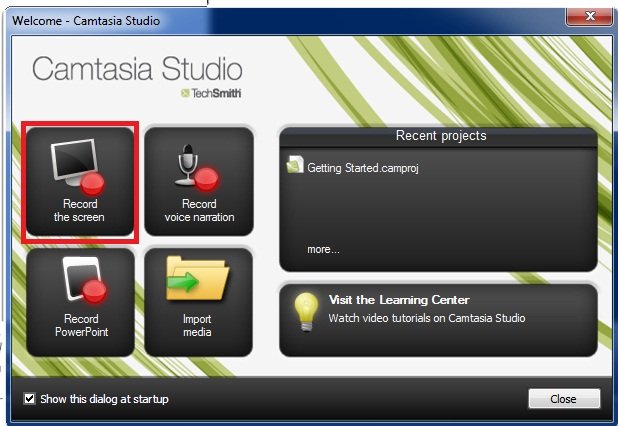
Notice when you first open the program, a window pops up showing 4 options, one being “Record the Screen.” I have illustrated it here:

2

Or you can click on “Record the Screen” in the task list of the interface.

3
 
The next step is self-explanatory, you choose the area you want to record or you choose the whole screen, depends on what you want, then start recording after the 3-second countdown. Stop by pushing F10 or the “Stop” button

Producing it into a GIF animation
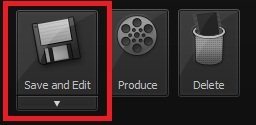
After you finish recording your video, a preview appears and in the corner there are 3 options:
Save and Edit, Delete, and Produce.

4

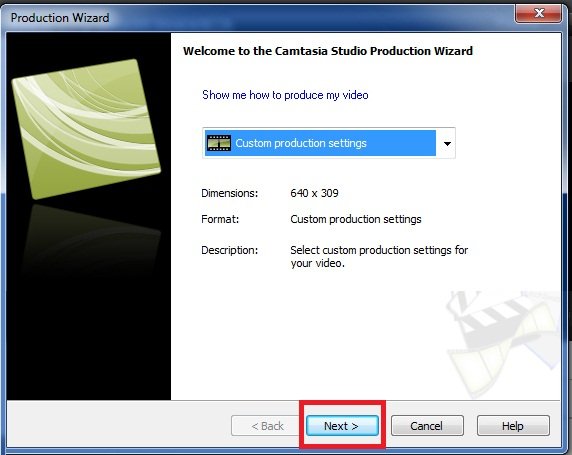
Click on Produce, save your video, and choose “Custom Production Settings” from the drop-down list and click “Next”.

5

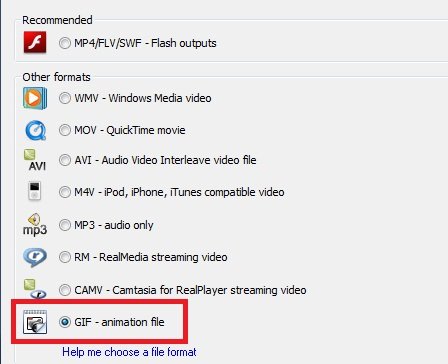
Then comes the Output format screen, which has lots of formats, GIF being one of them, choose it:

6

Then click Next on all the following screens, as they are not necessary. You may edit some forms for modified animations but I won’t go there. (On the last form is the name of the video so you should change that.) After clicking Finish on the last screen, it will start converting.

7 
Now this will take some time depending on the length of the video (40 seconds is more than enough). Lagging occurs when the video exceeds 35-40 seconds.And you are done! Your video is now gonna play in picture format, so you can send it to your cell-phone, upload it to your website in the format of a picture!

8

Thursday, 7 March 2013

Windows Live Programs

0 comments
Windows Live is the best online service for email and messenger. This is software you need to download and install. You shall get a lot of services from windows live. It is a free service created by Microsoft. But there are many features that you will need to pay for like the Windows Live Call, which is something like Skype.

Windows Live Mail is the most important application. We can compare it to Outlook Express. It features email, contacts and calendar services. I really like this program. It is better than any other mail client, with a nice user interface. We can use Gmail, Hotmail and any other email services which supports POP and IMAP like the Yahoo mail.


Windows Live Hotmail is the email service that can be used with any Windows Live Service. You only need to create one Hotmail account and use it anywhere on Microsoft website.

Windows Live Messenger is the messenger which has a lot of features. But it lacks the chat room service like that in Yahoo Messenger. But I really am against chat rooms. You won't find one nice person there. Always there will be more than one person typing and doing crazy things.
Windows Live Call works as a part of Make PC-to-PC voice / video calls to your Messenger contacts.

Windows Live Movie Maker is an application to easily create your own movies by using pictures, music, and videos you have. The software is erally good.

There are a lot of other services too, which are being developed as a part. Windows Live Photo Gallery helps you share pictures. Skydrive offers free file sharing up to 5 GB and the size is being increased.

Windows Live Onecare is an anti virus. But it is not free. I have been using a version of this antivirus from Microsoft and have never been in trouble with a virus. The main feature of this antivirus is that it won’t report that a file is a virus un-necessarily. Almost all other anti viruses (excluding McAfee) finds many viruses that are actually not viruses. Live OneCare Family safety is a feature that can be installed to create custom settings for different users on your computer so that they can be protected against illegal and unnecessary content from the internet, including websites and people in the internet.

For Windows Live Register here or download here

Friday, 20 April 2012

Active GIF Creator 3.5 (AGIF)

0 comments
Active GIF Creator 3.5 (AGIF) is a powerful, intelligible, compact and affordable gif maker for creating and optimization animated GIF- images, buttons, banners and other Web graphic that attract attention of your site visitors.


With Active GIF Creator you can:
  • make GIF and AVI- animations for the Web and presentation materials;
  • make banners;
  • make 2D and 3D buttons;
  • make various graphic using effects and other program tools;
  • add hidden signatures to GIFs to protect them from unauthorized use;
  • develop creative imagination.
 Program features:
- makes animated GIF- files from set of BMP, JPEG, ICO, PCX, PNG, TGA, PSD- files, and Windows Metafiles;
- imports frames from other GIF- files;
- imports and exports AVI- files, ANI- files (animated cursors) and bitmap strips;
- supports clipboard operations for images (BMP);
- manages list of images;
- edits images using internal image editor or script editor;
- duplicates, merges, crops, resizes, rotates and flips frames;
- defines GIF- files global parameters: GIF size, logical screen size, background color index, number of loops in animation;
- defines offset, transparency, interlacement, delay, title and value "how to remove" for each separate image;
- applies effects to whole image or to its rectangle part;
- puts particles on image;
- uses image collections;
- edits color palettes;
- creates 2D and 3D button images;
- creates animation scripts;
- adds and removes text commentaries;
- optimizes size of GIF- files;
- shows GIF size and download time for different speeds of modems;
- allows to preview your GIF- file on Web pages with different backgrounds;
- adds hidden signatures to GIFs to protect them from unauthorized use;
- creates GIF- files from command line in batch mode;
- saves images of GIF- file as a set of BMP, JPEG, PNG, TIFF or TGA- files;
- saves created animation as a project in a file with extension .agif;
- creates maps for tag <MAP> in HTML;
- generates HTML links;
- supports localization tools for different languages.
Reasons to buy Active GIF Creator.
Virtually every popular image editing software title comes with an option to create animated professional looking GIF images. Yet, most people find these built-in tools very counter- intuitive, complicated and almost impossible to use.
  • Active GIF Creator has many useful features, like support of most popular image formats; internal image editor; rich image editing options; image effects; color palette support; import / export to other graphical formats; advanced open picture dialog (thumbnailer); GIF- file size powerful optimization; HTML image map editor; button creator; batch mode; image collections; animation scripts and others.
  • The program's functionality in combination with the low cost has made it the first choice for many users and software evaluation websites. Plus, Active GIF Creator has a user- friendly, international interface and consumes very little system resources.
  • All registered users are entitled to free technical support and minor upgrades.
If looking for a well-rounded, efficient and affordable tool for creating great-looking animated GIF’s, stop by Active GIF Creator! Editors of 3d2f.com named the program "most perspective among competitors".

Download Active GIF Creator 3.5 (AGIF) sofware here

Thursday, 12 April 2012

Mount Everest, How Tall Is It? - A Mathematics Mystery

0 comments


Last night I started to read Mount Everest, The Reconnaissance 1921 which I downloaded for free from Google Books. In the introduction there is a three page explanation of the methods used to measure the height of Mount Everest. An explanation of the differences in measurements is also provided in the introduction. Part of that explanation includes differences in snow fall, cyclical deviations of gravity, and differences atmospheric refraction when observations were made. I'm not a mathematics teacher and will never pretend to be one, but reading that introduction did get me thinking about a possible mathematics lesson.

Applications for Education
Turn to pages 10 through 13 of Mount Everest, The Reconnaissance 1921 and read about the difficulties of accurately measuring Mount Everest in the late 19th and early 20th Centuries. It's interesting to note that most accepted measurements were more than 100 feet higher than today's accepted measurement. Tell your students that Mount Everest has shrunk over the last 100 years and ask them to solve the mystery of the shrinking mountain. 

On a mildly related note and on a promotion of a Mainer note, Snow in the Kingdom: My Storm Years on Everest by Ed Webster is one of the best books ever written about Mount Everest. If you enjoy good adventure stories and or stories about overcoming personal struggles, I think you will enjoy Webster's book. For my money, and I own two copies of it, it is far better than Krakauer's Into Thin Air.

Thursday, 29 March 2012

Download MotionBuilder Personal Learning Edition 7.0

0 comments
Autodesk gives industry professionals and those interested in real-time character animation an opportunity to explore all aspects of this award-winning technology while developing new skills. This special version of Autodesk MotionBuilder provides free access to the software, with no time limit, for non-commercial use.

Available for the Windows? XP Professional and Mac OS? X operating systems.
Autodesk MotionBuilder Personal Learning Edition offers almost every feature found in the full

commercial version of Autodesk MotionBuilder including:
Advanced real-time technology
Unique Story Timeline performance environment
Auto rigging, motion editing, motion layering, storytelling tools, and numerous other features for animating your characters
The ability to import and export FBL files to and from Maya Personal Learning Edition software.


Download MotionBuilder Personal Learning Edition 7.0 here

Tuesday, 20 March 2012

Sharpening Mathematical Logical Intelligence Children

0 comments
Indeed, every child is born with the potential of smart and the uniqueness of each that allows them to be intelligent. Howard Gardner in his Multiple Intelligences have, said there were eight intelligences in humans including: verbal/linguistic intelligence/language, logical mathematical intelligence, visual/spatial intelligence/spatial, musical/rhythmic intelligence, kinesthetic intelligence, interpersonal intelligence, physical intelligence, and intrapersonal intelligence naturalist. Duties of parents and educators is maintaining the qualities that formed the basis of intelligence to survive until the child was growing up, by giving environmental factors and good stimulation to stimulate and to optimize brain function and intelligence of the child.

Basically every child was awarded the logical mathematical intelligence. Gardner defines logical mathematical intelligence as the ability of scientific reasoning, computation of mathematically, logical thinking, inductive/deductive reasoning, and sharpness of abstract patterns and relationships. Can be translated as well as the ability to resolve issues related to the needs of mathematics as a solution. Children with this capability will be thrilled with the formula and abstract patterns. Not only on the number of maths, but also on the rise in activity that is both analytical and conceptual. According to Gardner there is a link between mathematical intelligence and linguistic intelligence. In mathematics, the child's ability to analyze or describe logical reason, as well as the ability to construct a solution of the problems that arise. Linguistic intelligence required for merunutkan and menjabarkannya in the form of the language.

Still according to Gardner, the mathematical characteristics of intelligent logical child at the age of a toddler, child loves a explore to satisfy her curiosity like exploring every corner, observe the things that are unique to her hobby of fiddling with the object as well as, do a test run. Like what if my feet in a bucket full of water or curious composing puzzle. They are also often asked about different phenomena and are demanding an explanation of each logical questions asked. In addition children also love to classify various objects based on color, size, type and others and was fond of counting.

Stimulation of daily activities around us.

How we stimulate mathematical intelligence logical children from an early age? Bagimana we instill logical mathematical concept early on? We can introduce first understanding of mathematics from an early age from our surroundings and everyday experience as well as giving the child the stimulation of support. Of course this was done without coercion and pressure, and through the game-the game. In the education, the role of parents is irreplaceable and the House is the main base of education of the child. Many games of exploration that can hone the ability of mathematical logic, but of course this has to be adapted to the age of the child. When toddlers play sand, real child is animating his muscles are trained so that future child halusnya motor capable of holding a pencil, draw and others. By playing the real child study estimation of sand by pouring or take the later all that's in the math.

When we introduce figures on children do not only as a symbol, for example we have two oranges, provide two citrus fruits. So the children know about the concept of numbers and number. The song can also be a medium for introducing various themes about the numbers. There are five songs such as balonku. Or we can create his own songwriting simple while visualizing our fingers as a tool to count, so that gradually the child easily captures the abstract concepts in numbers

After the children get to know the numbers 1 to 10, then the number zero was introduced to Provide an understanding of the concept of number. zero in early childhood is not easy. This game can be done by calculating a magnet affixed to the refrigerator. Try taking one by one and ask the children count the remaining. Do periodically so that the magnets on the fridge is no longer attached. While it can be shown that the views on the fridge is 0 (zero) magnet.

While in the kitchen, we can introduce the concept of the classification and grouping of related to the concept of mathematical logic, for example by means of the child are asked to classify the vegetables based on color. Arithmetic skills in operation of a simple number, such as when three apples eaten one then the rest is how. It could also create geometric forms through pieces of vegetables. Once in a while do also make cake with activities, other than to increase familiarity and warmth of the family, children can also learn mathematics through activities whereas, take the necessary, calculate the time. Cook while looking recipes also trained the skills of reading and learning vocabulary. Don't risaukan a State of the kitchen would be dirty and cluttered with flour and scattered belongings, because such an ad slogan that dare dirty is good. The child is happy and unknowingly they learn many things.

We can also provide mathematical concepts such as quantity, such as understanding how the number of fish in the Aquarium. When relaxing in front of the home, children are invited calculate how much a passing motor in 10 minutes. Recommend also the concept of comparison such as larger, smaller and so on, for example by asking the child with bread donut bread cake which one size larger. When we introduce and inquire on the child that the car is moving faster than the motor, palms taller than trees, guava, or bags heavier than his older brother bag, in fact it is already included in the concepts taught pace, length and weight, so that the function of intelligence mathematics become active.

For activities outside the home, when we invite children to shop, engage it in the transaction so that the train operating skills such as addition and subtraction. It could be with the game store or the market the market with friends.

Traditional games also can stimulate and enhance mathematical intelligence such as congkak logical child or dakon game as a learning tool is also useful to train and arithmetic ability of fine motor manipulation primarily train the forces of the hand at a later date is useful for getting started writing. As long as children are required to follow focus play which in turn will train a child's concentration and perseverance is needed when the child attends lessons in school.

Smarter by playing to savvy child

Why much stimulation through games and play activities that fun? Because the play is going to make children able to express ideas and feelings and make the child become more creative. The play also will exercise cognition or ability learned the child based on what is experienced and observed from its surroundings. When playing a challenging game, children have a chance in solving problems. For example, compose or play lego pasel. Children exposed to troubles, but it's not a matter of fact, it's a game that needs to be done. The problem of bringing boys unconsciously trained to solve a problem. This will strengthen the ability of children out of trouble. For example when being menalikan, the child will attempt to use all his skill to complete up to completely.

Thus the children will love the math because math lesson turned out there were around them and they know the purpose of learning math. Of course this should be supported with a pattern of teaching mathematics in schools that are fun, creative, contextual, realistic, emphasis on processes and student understanding and problem solving, creative in promoting and teaching the concept of mathematics as well as with a wide variety of games and props that would be interesting so math lessons are fun and eagerly awaited. In the book entitled Learning is Most Effective When It’s Fun.

Saturday, 17 March 2012

Showcase Education : engaging educational resources made easy

0 comments
A selection of simple educational resources for you to adapt for particular projects for younger pupils.
Older pupils can also use Opus for general curriculum tasks or for specific qualifications such as DiDA. For the working files to these publications visit our Resource section.

 
Water Cycle Animation
A small animation of the water cycle intended to illustrate the use of the tween animation as a way of animating processes.
Made with Opus Creator for output in Flash format. NOTE: set the publish option to "scale to fit" when publishing to use the animation at a larger size.


Europe
A geography project providing an introduction to the concept of Europe and its main countries.

 
Primary School Maths
A simple maths quiz with drag and drop answers. You could easily extend this to more complex questions.

Monday, 5 March 2012

Educational Software

0 comments
In a broader sense, the term edutainment describes an intentional merger of computer games and educational software into a single product (and could therefore also comprise more serious titles described above under children’s learning software). In the narrower sense used here, the term describes educational software which is primarily about entertainment, but tends to educate as well and sells itself partly under the educational umbrella. Software of this kind is not structured towards school curricula, does not normally involve educational advisors, and does not focus on core skills such as literacy and numeracy.
manufacturers, including many established educational book publishers.

Educational software on custom platforms

Some manufacturers regarded normal personal computers as an inappropriate platform for learning software for younger children and produced custom child-friendly pieces of hardware instead. The hardware and software is generally combined into a single product, such as a child laptop-lookalike. The laptop keyboard for younger children follows an alphabetic order and the qwerty order for the older ones. The most well-known example are Leapfrog products. These include imaginatively designed hand-held consoles with a variety of pluggable educational game cartridges and book-like electronic devices into which a variety of electronic books can be loaded. These products are more portable than general laptop computers, but have a much more limited range of purposes, concentrating on [[literacy]

Software in corporate training and tertiary education
Earlier educational software for the important corporate and tertiary education markets was designed to run on a single desktop computer (or an equivalent user device). The history of such software is usefully summarized in the SCORM 2004 2nd edition Overview (section 1.3), unfortunately, however, without precise dates. In the years immediately following 2000, planners decided to switch to server-based applications with a high degree of standardization. This means that educational software runs primarily on servers which may be hundreds or thousands of miles from the actual user. The user only receives tiny pieces of a learning module or test, fed over the internet one by one. The server software decides on what learning material to distribute, collects results and displays progress to teaching staff. Another way of expressing this change is to say that educational software morphed into an online educational service. US Governmental endorsements and approval systems ensured the rapid switch to the new way of managing and distributing learning material.

Tuesday, 28 February 2012

Educational software for Learn

0 comments

In a broader sense, the term edutainment describes an intentional merger of computer games and educational software into a single product (and could therefore also comprise more serious titles described above under children’s learning software). In the narrower sense used here, the term describes educational software which is primarily about entertainment, but tends to educate as well and sells itself partly under the educational umbrella. 

Software of this kind is not structured towards school curricula, does not normally involve educational advisors, and does not focus on core skills such as literacy and numeracy.
manufacturers, including many established educational book publishers. 

Educational software on custom platforms

Some manufacturers regarded normal personal computers as an inappropriate platform for learning software for younger children and produced custom child-friendly pieces of hardware instead. The hardware and software is generally combined into a single product, such as a child laptop-lookalike. The laptop keyboard for younger children follows an alphabetic order and the qwerty order for the older ones. 

The most well-known example are Leapfrog products. These include imaginatively designed hand-held consoles with a variety of pluggable educational game cartridges and book-like electronic devices into which a variety of electronic books can be loaded. These products are more portable than general laptop computers, but have a much more limited range of purposes, concentrating on [[literacy]

Software in corporate training and tertiary education

Earlier educational software for the important corporate and tertiary education markets was designed to run on a single desktop computer (or an equivalent user device). The history of such software is usefully summarized in the SCORM 2004 2nd edition Overview (section 1.3), unfortunately, however, without precise dates. In the years immediately following 2000, planners decided to switch to server-based applications with a high degree of standardization

This means that educational software runs primarily on servers which may be hundreds or thousands of miles from the actual user. The user only receives tiny pieces of a learning module or test, fed over the internet one by one. The server software decides on what learning material to distribute, collects results and displays progress to teaching staff. Another way of expressing this change is to say that educational software morphed into an online educational service. US Governmental endorsements and approval systems ensured the rapid switch to the new way of managing and distributing learning material.

Tuesday, 21 February 2012

Download English Dictionary software

0 comments
TheSage's English Dictionary and Thesaurus is a professional software package that integrates a complete dictionary and multifaceted thesaurus of the English language into a single and powerful language reference system.


TheSage can look up words directly from almost any program (IE, Word, Firefox, Outlook, Thunderbird,... ).

Features:

1. Comprehensive Dictionary - Multiple detailed definitions (+210,000)
2. Complete Thesaurus - Nearly 1,400,000 relationships between definitions (synonyms, antonyms, hypernyms, hyponyms, meronyms, holonyms,...)
3. Example Sentences - A large collection that already includes approximately 50,000 examples of usage.
4. Pronunciations - +70,000 phonetic transcriptions.
5. Information Integration - Each definition has its own specific thesaurus.
6. Cross-Referencing - Any and all displayed words are clickable, triggering a new lookup.
7. Wildcard Search - Match single/multiple characters as well as filter by single/groups of vowels and consonants.
8. Anagram Search - Only valid English words are returned.

Download TheSage's English Dictionary and Thesaurus is a professional software here

Monday, 20 February 2012

How to Make Technology in the Classroom

0 comments
The ISTE Classroom Observation Tool (ICOT) is an observation tool developed by the International Society for Technology in Education (ISTE). The association’s purpose is to engage in advancing excellence in learning and teaching through technology. The association is also responsible for developing the National Educational Technology Standards (NETS) for students, teachers, and administrators. The classroom observation tool was designed to evaluate the amount of technology being used in the classroom as well as its effective use based on the NETS.


Why use ICOT as an Observation Tool?

There are several good reasons for using an observation tool such as ICOT to evaluate the effective use of technology in the classroom. The authors report that technology spending in education will reach $56 billion by 2012. A final reason for using such technology to evaluate the use of technology in the classroom is for administrators to better prepare and plan professional development for teachers in the use of technology. The components of the ICOT instrument consist of setting, groups, activities, technology, NETS, and charts. The technology component is the meat of the observation tool. The NETS component reports on what teacher or student standards are being taught or used during the lesson.

Observation

For the practical purposes of this article the writer used the ICOT instrument to observer a fifth grade teacher at the writer’s school. The teacher is a fifth year teacher who has taught traditional classes as well as boys’ single gender classes. There are five fifth grade classes containing approximately 23 students per class. Teachers are encouraged to engage students in the use of technology at least on a daily basis.

There were 23 students in the classroom at the time. Each student had their own lap top computer provided by the school. Students were creating, researching, collaborating during the lesson. Second, the teacher created a developmentally appropriate learning activity for fifth grade boys. Third, the technology used during the lesson enhanced instruction. Fourth, the technology supported learner-centered strategies. Fifth, the teacher applied technology to develop students’ creativity. Finally, the teacher modeled legal and ethical technology practices by using the interactive board to show examples.

ICOT is a useful tool for administrators to safely document the effective use of technology in the classroom. The tool allows educators to observe technology being used by both students and teachers based on the NETS. Many general classroom observation tools touch on technology in the classroom, but very few if any go in to as much detail as the ICOT does. As administrators observe in classrooms and upload data to the website, district administrators can generate and view reports that can guide professional development and future purchases.

Effective Classroom Management

Let's not also forget that a large proportion of pupils in our classes are EBD, ADHD or on the autistic spectrum and as such, have a genuine need for unambiguous, precise instructions.

The following example illustrates this need perfectly:

At the first EBD centre I taught in, the pupils (11-14yrs) were allowed on the yard at break to play football.

The instructions, which sound incredibly pedantic, broke the short 200 yard journey into very small segments and went something like this...

(wait for them to stand in silence before giving next instruction) "Walk across the hall to the fire door and wait in line." "Go though the doors and walk down the corridor to the outside doors. Here's another example to show how vague instructions are such a waste of time...

On the way back from the yard at break one day, Mark was deliberately lagging behind, bouncing the football.

"Come on Mark, quick... Hurry up Mark, lessons have started... Mark! Break's over Mark!... Quickly Mark!... Mark!... Mark then proceeded to enjoy the undivided attention of two members of staff as they altered their approach from friendly cajoling and encouragement to aggressive shouting and frustrated threats. Had the teacher altered her instruction slightly at the beginning, the situation could have been very different. "Mark break is over.


References
Collier, S., Weinburgh, M. H., & Rivera, M. (2004). Infusing technology skills into a teacher education program: Change in students’ knowledge about and use of technology. Journal of Technology and Teacher Education, 12(3), 447-468.

Moskowitz, S. & Martabano, S. (2009). Administrators accessing the effectiveness of technology. Retrieved from http://www.schoolcio.com/default.aspx.

Sunday, 19 February 2012

Educational Software for Learn With Fun

0 comments
School software are created to effectively teach kids or even adults courses of choice either as a classroom supplement or as an educational source for self learning. It is an innovative learning tool that can effectively transfer information in a unique enjoyable way.

For classroom purposes, having school software may be a major expenditure for teachers. With the wide collection of different education software available, it is critical that you are choosing the right ones. Is it easy to finish the course by themselves or does it need help guides that would aid them through the course?

It is also critical for effective learning that the navigation is simple and easy to comprehend. Some might cost a little higher but offers a broad curriculum that displays the learning curve. Natural Motivation.

Saturday, 18 February 2012

New math software

0 comments
Math learning need support so learning more interesting and meaningful. Therefore, teachers must prepare learning material as well. In order to create a good teaching material must be supported with math learning software, because of the inordinate use of mathematical symbols. Here I refer to mathematical software that can be downloaded.

1. CalcuTray
CalcuTray is a simple, quick and easy to use calculator that resides in the system tray and enables you to quickly perform a mathematical calculation by simply typing in the numbers, using the standard mathematical operators (+, -, *, / etc.). In addition to basic calculations, CalcuTray also be used to solve square roots and convert fractions to decimals. You can also use Pi in any of your calculations.

2. Kalkules
Kalkules is an universal scientific freeware calculator with an amount of untraditional functions, which can be used particularly by high school or university students. It also offers a wide range of tools, which make your calculations easier and faster.